

Automations
An automation says when, if and then: when a task moves to “Fait”, record the time; when a negative review comes in, notify the person in charge and post to Slack; every Monday at 9 a.m., create the row for the team meeting. And when one action is not enough, it follows a flow: find a row, take one branch or another depending on what it says, repeat steps on each row that matches a filter, reuse in one step what an earlier step found or wrote, wait three days before a follow-up, send a PDF as an attachment.
They open from Automations, in the block of the open base at the bottom of the sidebar, and require the Manage level.
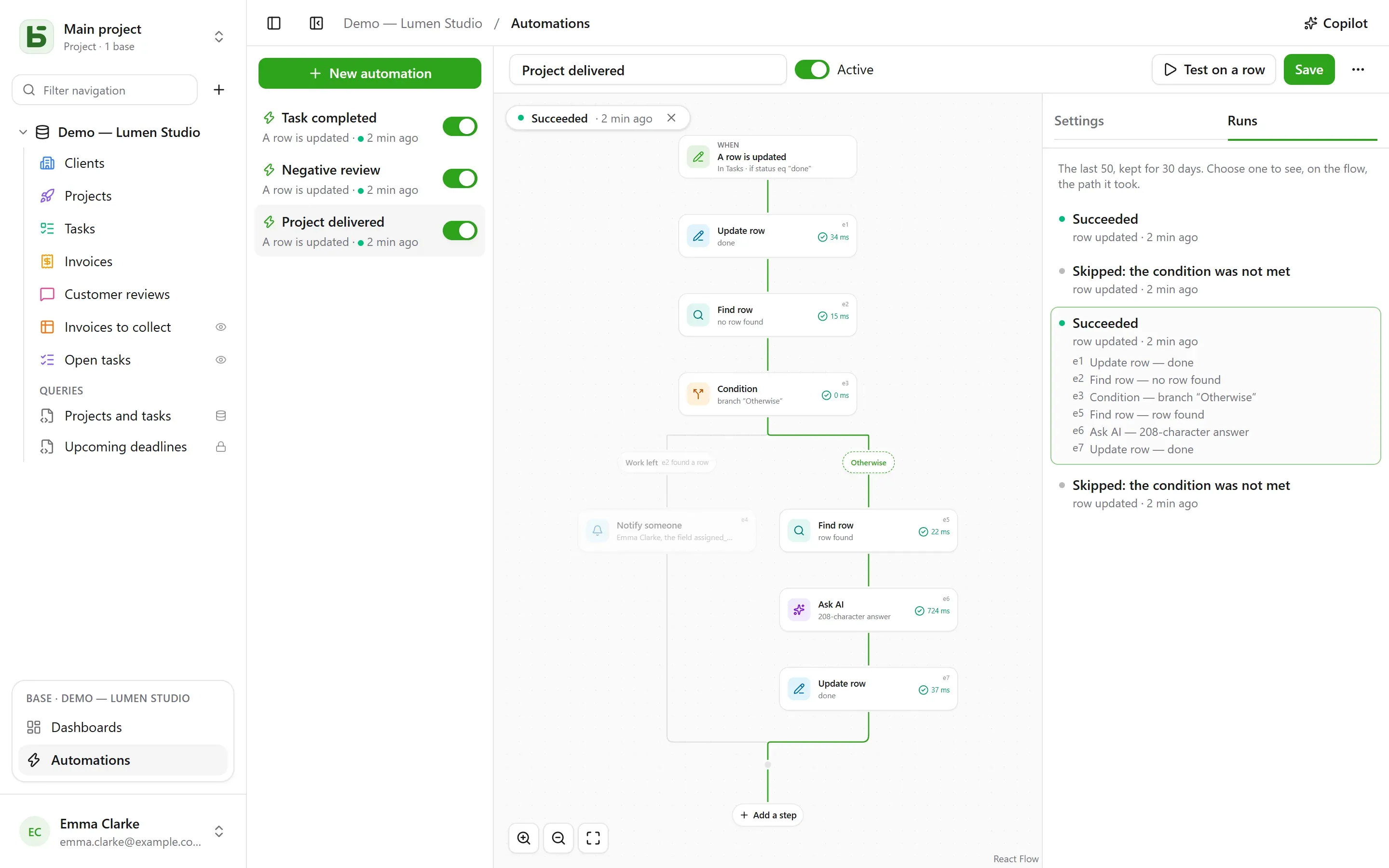
The flow
Section titled “The flow”The flow is drawn from top to bottom: the trigger, then each step. A + on a line opens the list of steps, grouped by category — Rows, Communicate, Documents, AI, Logic — with a search, and adds the one you choose at that point; a card opens its settings on the right. A simple automation — a trigger and an action — fits in two cards, and is set up as before.
| Trigger | Settings |
|---|---|
| A row is created | the table |
| A row is updated | the table, and optionally only the fields to watch |
| At a set time | every hour, every day or every week, at the chosen time and in the chosen time zone |
| A button is clicked | a Button field of the table |
| A row is deleted | the table; the steps cite the row as it was |
| A row enters a filter | the table and the filter: the automation runs when a row enters it, and does not run again until it has left — “an invoice becomes overdue”, not “an overdue invoice is updated” |
| A date arrives | a Date field of the table, an offset — three days before, the same day, a week after — and the time: due-date reminders, contract anniversaries |
| A webhook is received | nothing: the automation gets its own address, which another piece of software calls (details) |
A trigger on rows sees all writes: the interface, the API, an agent, a shared form, and even direct SQL — automations start from the history, which captures them all.
Only if
Section titled “Only if”An optional condition, in the filter language —
statut eq "fait", montant gte 10000 and payee eq false — evaluated on the row at the
moment of acting. A run whose condition is not met is “skipped”, and says so.
Up to forty steps, in order; the first one that fails stops the following ones — except inside a Try block (details).
| Step | What it does |
|---|---|
| Update row | writes values into the row that triggered — or into the one a step found or created |
| Create row | in this table or another one of the base |
| Find row | the first row of a table that matches a filter, so that the following steps can cite or update it |
| Notify someone | a notification to chosen people, or to the one in a Person field |
| Send an email | to people on the team, to the one in a Person field, to the address in an Email field — a client, a supplier — or to written addresses; the subject and text cite the row and the previous steps |
| Call webhook | an HTTPS request to a service — method, address, headers and body of your choosing (details); its response can then be cited |
| Send to Slack | a message in a connected channel |
| Ask AI | an answer from the AI provider to a prompt that cites the row and the previous steps — draft, summarize, classify —, read as a text, a number, yes or no, a date or a choice from a list |
| Condition | several branches: the first one whose condition is met is taken, “Otherwise” when none is; the branches then join again |
| For each row | the steps it contains, once for each row of a table that matches a filter (details) |
| Delete a row | the row that triggered, or the one a step found — it goes to the trash |
| Count and add up | the number of rows matching a filter, their sum, average, minimum or maximum, to cite or test afterwards |
| Generate a PDF | the document of a row, stored in a File field or attached to an email |
| Wait | a duration, or until the date in a field (details) |
| Try | steps, and others to run if one of them fails (details) |
| Run an automation | another automation of the base, on a row of its table |
A search that finds nothing does not stop the flow: the steps that were to update its row are skipped. To do something else in that case, If no row is found…, below the search, adds a condition that tests it.
A condition tests a row with a filter, or a value: the AI’s answer, a webhook’s code, a
total — “{{e2.reponse}} equals Urgent”, “{{e3.somme.montant}} is greater than or equal to
1000”. Numbers are compared as numbers, text without accents or capitals.
For each row
Section titled “For each row”The For each row step reads the rows of a table that match its filter — empty: all of
them —, in the chosen order, up to its limit (50 by default, 200 at most), then runs the steps
placed inside it once for each one. “Every Monday, follow up on unpaid invoices” is written as:
At a set time, then For each row of invoices matching
payee eq false and relancee eq false, and inside the loop an email to the invoice’s contact
and Update row to check “Relancée”.
Inside the loop, the step’s identifier names the current row: {{e1.client}} cites it, and
Update row offers it among the rows to update. After the loop, {{e1.nombre}} says how many
rows it processed — for a summary on Slack, say. The filter can cite what came before:
triggered by a paid invoice, facture eq {{_id}} loops over its detail rows.
Beyond the limit, the remaining rows wait for the next run, which says so: take the rows already handled out of the filter — a “relancée” checkbox, a date — so they all get handled across runs. A loop can’t contain another one, and a run stops after two minutes.
The Wait step pauses the run — three hours, two days — or until the date in a field of a row, with an offset and a time: “the day before the due date, at 9 a.m.”. The run appears as Paused in the Runs tab, with the date it resumes.
It resumes at the next step by re-reading its rows: “three days after the quote is sent, if it is still not accepted, follow up” is written as Wait 3 days, then a condition on the quote’s status, as it stands that day. Disabling the automation stops paused runs; a wait cannot be placed inside a loop or a Try block, and lasts at most a year.
The Try block has two branches. The first one runs; if one of its steps fails, the flow
continues with the second, On failure, which cites the failure — {{e4.erreur}}, the code,
and {{e4.etape}}, the step —, then resumes after the block. This lets you notify someone when
a service does not respond, without stopping everything.
More simply: a webhook can retry itself up to three times after a service outage, and a loop can continue despite a row that failed.
A PDF and an email
Section titled “A PDF and an email”Generate a PDF makes the document of a row — with a document template of its table, or the sheet of all its fields — and can store it in a File field. Send an email can then attach it, along with the files of a File or Image field:
- an email to each one, or one, to everyone, with recipients in CC;
- a message in rich text — bold, lists, links — that cites the row;
- a reply-to address: yours by default, or the one in an Email field;
- up to 50 recipients, 10 attachments and 15 MB.
“When a quote moves to Accepted, send the invoice to the client, with accounting in CC”: A
row enters a filter statut eq "accepte", Generate a PDF with the Invoice template,
Send an email to the client’s Email field, with the invoice attached.
A service that calls basedb
Section titled “A service that calls basedb”With the A webhook is received trigger, the automation has its own secret address, to give to the software that must start it — an online shop, an external form, an automation tool:
curl -X POST "https://basedb.example.com/api/v1/hooks/<secret>" \ -H "content-type: application/json" \ -d '{"client": {"nom": "Dupont"}, "total": 120}'The steps cite what it sent: {{trigger.client.nom}}, {{trigger.total}}; a form reads the
same way, a text through {{trigger.texte}}. The address is copied from the trigger’s
settings; Change address replaces it, and the old one stops working at once. A call
receives 202, and the automation runs within the second.
Call a service
Section titled “Call a service”The Call webhook step sends the automation’s data by default, as a POST: the chosen row
and what the previous steps found or wrote. To talk to a service the way it expects, you set:
- the method:
POST,PUT,PATCH,GETorDELETE— the last two without a body; - the address, which can cite values after its host —
https://api.exemple.fr/clients/{{e2.numero}}; each value is encoded there; - headers, whose value can cite:
Idempotency-Key: {{_id}}; - the body: the automation’s data, Custom JSON, a form (one
key=valuepair per line) or a text. In a JSON, a citation inside quotes is text, and outside quotes a value — a number, yes or no, a list:
{ "facture": "{{e1.numero}}", "montant": {{e1.montant}}, "payee": {{e1.payee}} }An API key or a token goes in a secret header (the lock icon): encrypted with the instance key, it is never shown again — not on screen, not by the API, not to Copilot — and is only sent to the host you gave it for. Changing the address’s host requires giving it again; Replace enters a new one.
Ask AI
Section titled “Ask AI”Like an AI field, the step sends its prompt to the provider, with each citation replaced by its value:
Does this review from {{auteur}} call for action on our part? {{avis}}You choose the expected answer — free or short text, a number, yes or no, a date, a web
address, or a choice from a list, which can be taken from a select field. The model is told
so, and an answer that does not contain one makes the step fail. The following steps cite it
as {{e1.reponse}}: in the title of a created task, a message, or a select field, where it is
filed under the choice with the same label.
What the prompt cites goes to the provider: the step asks for your consent, to be given
again when the prompt changes. Each call is logged and counts, along with AI fields, toward
BASEDB_AI_FIELD_QUOTA (300 per hour by default). The AI does nothing on its own: it is the
steps placed after it that write or notify.
Citing
Section titled “Citing”Values, messages and filters cite what came before, from the { } button next to each text:
{{Titre}},{{_id}}: the row that triggered;{{e2.titre}},{{e2._id}}: the row found, created or updated by stepe2— each step shows its identifier on its card;{{e3.statut}},{{e3.reponse.numero}}: what webhooke3responded;{{e4.reponse}}: the answer of AI stepe4;{{e5.client}}in loope5, the current row;{{e5.nombre}}after it, the number of rows processed;{{e6.nombre}},{{e6.somme.montant}},{{e6.moyenne.montant}},{{e6.max.echeance}}: what stepe6counted;{{e7.erreur}},{{e7.etape}}: the failure caught by the Try blocke7;{{e8.nom}}: the name of the PDF from stepe8;{{trigger.client.nom}}: what an incoming webhook sent;{{_maintenant}}: the moment of the run.
A value made of a single citation passes the value itself: a relation, a person, a choice — this is how a created row is linked to the one a search found. In a filter, a citation is always a compared value, never filter language.
A step can only cite what has certainly happened before it: what one branch found can no longer be cited after the condition. The editor points this out on the card before saving.
Copilot
Section titled “Copilot”Copilot, in the header, opens a natural-language conversation on the right about the base’s automations: “when a task moves to review, notify the assignee”, “add an AI summary to the notes”, “why did the last run fail?”. It answers and proposes a whole automation — the one on screen, modified, or a new one —, with the list of what changes.
Copilot saves nothing: Apply to the flow shows the proposal in the editor, where you review it before saving — and Cancel, on the card, returns the flow to how it was. A new automation opens in the editor, ready to be created. Each proposal is checked as a save would be; what does not hold is dropped, and said.
By default, only the structure goes to the AI provider, along with the conversation: the
tables and their fields, the base’s automations, the one on screen as the editor shows it, and
its latest runs — their statuses and error codes, never a value. People and Slack channels are
sent as placeholders (p1, s1), never by their identifier. The Allow reading data box
lets Copilot read rows for the conversation (50 at most per read), each read listed under its
answer.
Testing and monitoring
Section titled “Testing and monitoring”Test on a row runs the saved automation on a chosen row, for real. The Runs tab keeps the last 50, for 30 days: pending, running, succeeded, skipped with its reason, failed with its code. Choosing one lays it over the flow — the branch taken is traced, each step passed says what it did and how long it took, the rest is dimmed. Inside a loop, each step also says how many times it ran.
On whose behalf it acts
Section titled “On whose behalf it acts”An automation acts with the permissions of the person who last saved it, decided again on every run: if that person loses a permission, the step that needed it fails instead of bypassing it, and a search only finds what they can read. The history shows it as “Automation ‘Tâche terminée’ · on behalf of …”, and its writes can be undone like any others.
Limits
Section titled “Limits”- What an automation writes triggers no other automation: whatever must follow on is written in a single flow, or through Run an automation, three levels at most.
- A search returns one row, the first; a loop processes 200 at most per run. A run lasts two minutes at most, not counting waits.
- No scripts. An email goes out through the instance’s mail server.
- A base template only carries automations without searches, loops, conditions or AI steps, and never a webhook.
- A webhook does not follow redirects and waits 10 seconds at most; a response other than 2xx fails the step, after its retries.
- An arriving date is checked every minute; only the ones that arrive after the automation was saved count.
- 100 runs per hour per automation; a missed scheduled time is caught up only once.
- The delay between the write and the action is on the order of a second.
basedb is open-source software by Eodia, an AI-native software studio.