

Environments
A base can have environments: production, staging, development… Each one is a full base in its own right — its schema, its tables, its rows, its permissions — and they all share the lineage of the base, its tables and its fields.
In the interface
Section titled “In the interface”The sidebar shows one line per base, with a badge that says which environment is open and lets you switch. The badge does not appear as long as there is only production.
Environments are added, renamed and deleted in Edit base…: a new environment is born from a copy of the schema of another one, without its rows.
Comparing environments
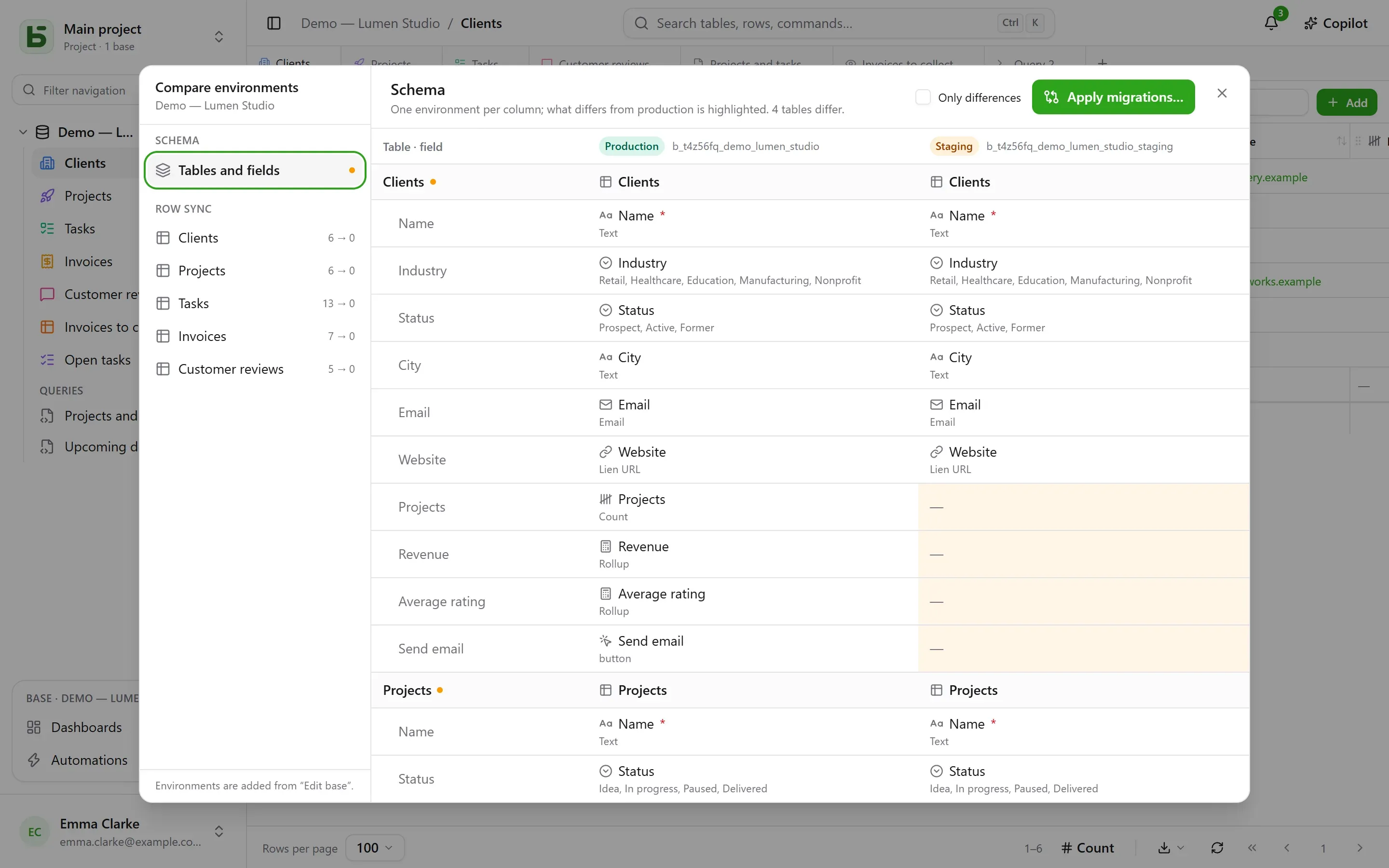
Section titled “Comparing environments”From the base’s menu, under More actions, Compare environments… opens a dialog:
- Schema: environments in columns, tables and fields in rows; what differs from production is highlighted.
- Apply migrations… prepares the plan to go from one environment to another, step by step. It never checks by default what would undo a more recent change in the target.
- Row sync: table by table, carry rows over from one environment to another, by identifier.
How basedb knows who changed what
Section titled “How basedb knows who changed what”The comparison relies on the schema history: every creation, change or deletion of a table or a field is captured by a trigger on the catalog, and can be read in the “Schema” tab of the history. Lineage identifiers link a staging field to its production counterpart, even when renamed.
Through the API, the SDK and MCP
Section titled “Through the API, the SDK and MCP”A token created for the whole base opens all its environments, today’s and those you will add: a single token for production and staging. The program or the agent chooses the environment on each call:
| Where | How |
|---|---|
| REST API | the X-Basedb-Environment: recette header, or ?environment=recette |
| SDK | db.environment('recette') |
| MCP | the …/mcp?environment=recette address, or a tool’s environment argument |
| n8n | the Environment field of the credential |
Without any of this, each base designates its own environment: the production’s name opens production, the staging’s name opens staging. A token can also, when it is created, be limited to the environment on display: it then sees no other. Either way, its permissions are intersected, environment by environment, with those of the person who created it.
In SQL
Section titled “In SQL”Each environment is a schema: b_t4z56fq_ventes for production, b_t4z56fq_ventes_recette
for staging. Your queries switch environments by switching schemas — or search_path.
basedb is open-source software by Eodia, an AI-native software studio.