

Dashboards
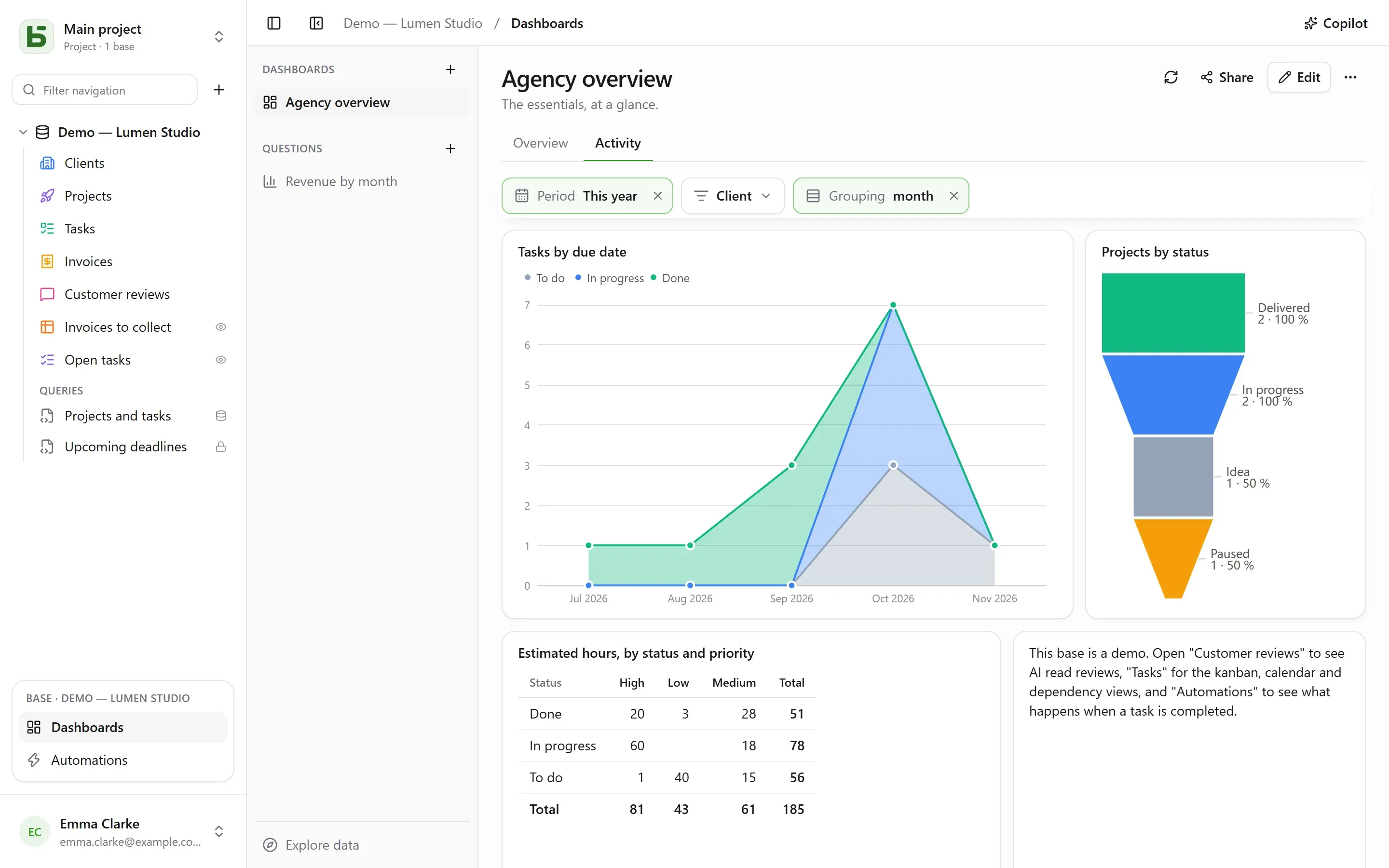
A dashboard gathers on one page what a team looks at every day: the figures that matter, how they change month after month, the breakdown of a status, the upcoming deadlines. Each card on it shows a question — a reading of the base, built with the mouse or written in SQL — and filters at the top of the page drive the cards linked to them.
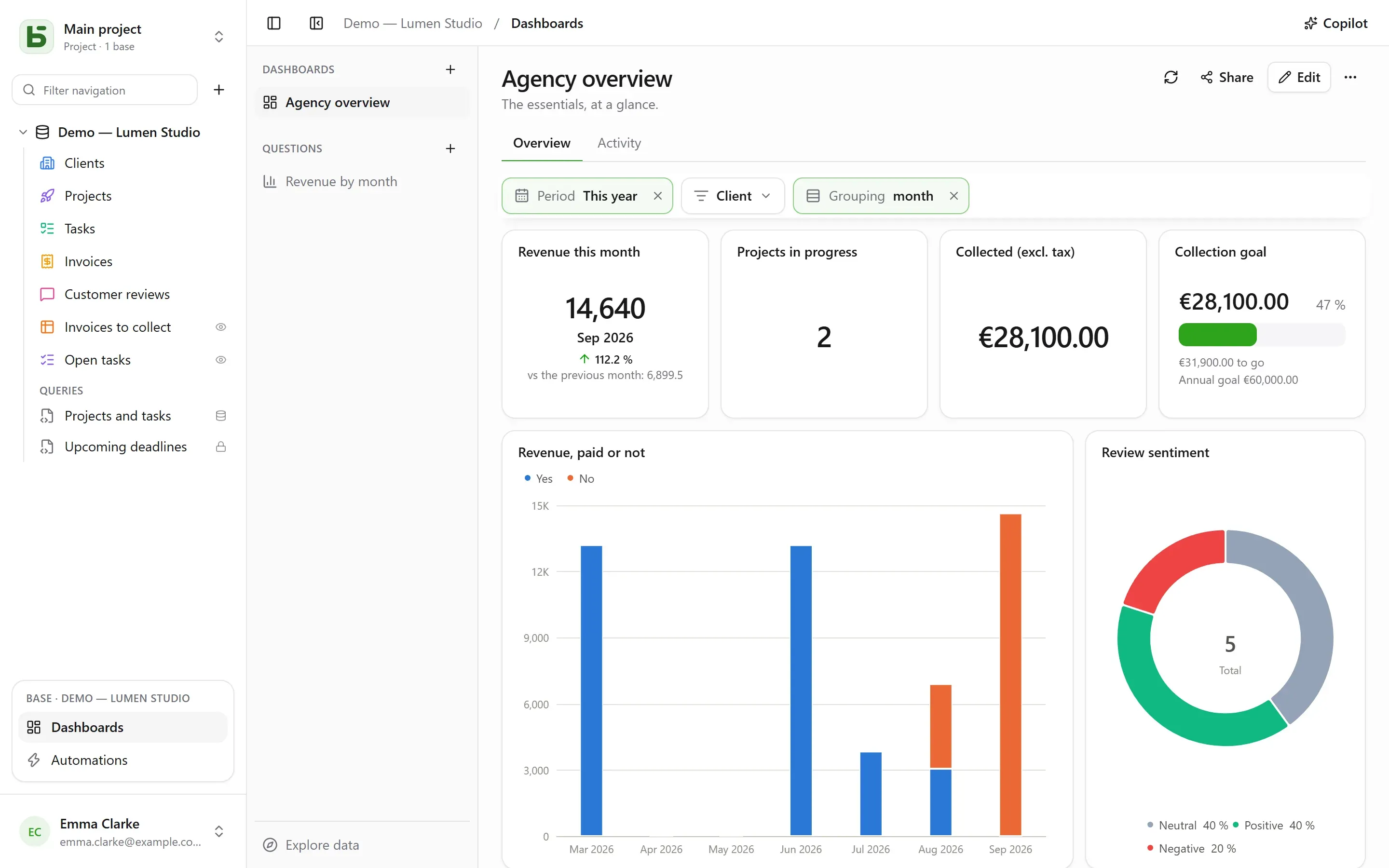
Everything opens from Dashboards, in the block of the open base at the bottom of the sidebar. On the left, the base’s dashboards and saved questions, and Explore data to ask a question without saving anything. Every reader of the base can view, explore and save their own questions; building a dashboard and sharing a question require the Manage level.
A saved question is personal — only you see it —, to the whole base or to groups. Its menu, right click or ⋯, opens it in a tab next to the tables, changes its name and sharing, or deletes it. The + in the tab bar also offers New question and New SQL question.
Save, in a question’s header, keeps it; a question you cannot edit offers Save a copy instead, which becomes your own. ⋯ (More actions) also offers Name and sharing…, Save a copy… and Delete question; a tab that was showing it keeps its content, now unsaved again.
Asking a question with the mouse
Section titled “Asking a question with the mouse”A question is built in steps, one below the other:
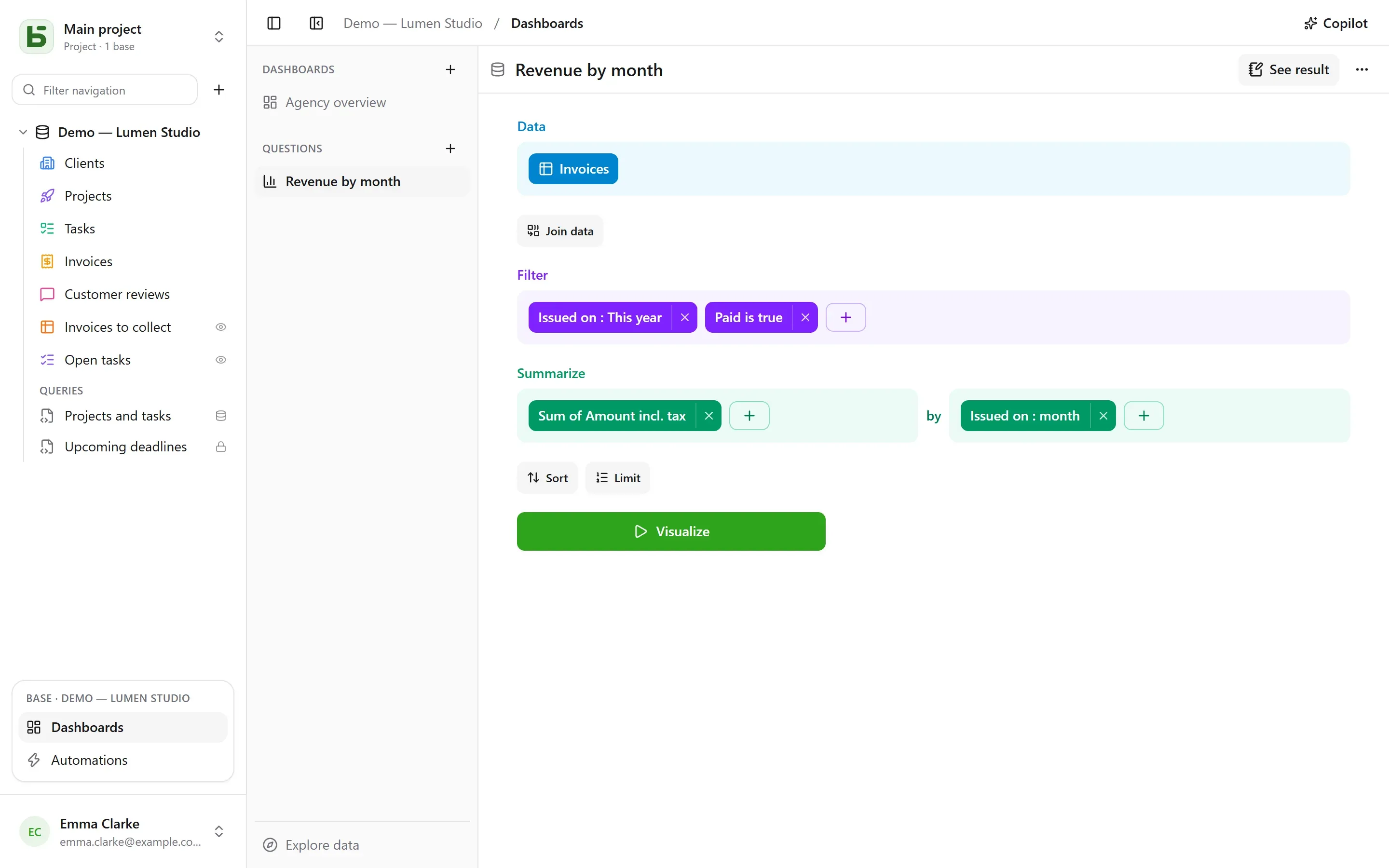
| Step | What you choose there |
|---|---|
| Data | the starting table, and the columns shown when nothing is summarized |
| Join data | another table of the base, linked by a relation — suggested automatically — or by two columns of the same kind; left, inner, right or full join |
| Filter | per column, with what its type offers: is / is not, contains, between, empty…; for a date, a period: today, the last 30 days, this month, last quarter, from … to …; or an expression written as in the views’ toolbar |
| Summarize | measures — number of rows, sum, average, median, minimum, maximum, distinct values, standard deviation, cumulative totals — by one to three columns |
| Sort, Limit | the order of the rows, and how many at most |
A date is grouped by day, week, month, quarter or year, or by position — day of the week, month of the year, hour of the day; a number, into ranges. A multiple select counts each row in each of its choices. Periods are read in your time zone and the week starts on the day set in your settings.
Visualize runs the question. The result is shown in the way that suits it — a number, a line, bars, a table — and can be changed at the bottom of the screen:
| Visualization | To show |
|---|---|
| Number, Trend, Progress, Gauge | a value; the latest period against the previous one and the same one last year; progress toward a goal |
| Column, Bar, Line, Area, Combo | measures along a dimension, as series side by side, stacked or at 100% |
| Pie, Funnel | shares, stages |
| Scatter | two measures against each other, a third as size |
| Table, Pivot table | the rows, sortable; rows by one dimension, columns by another, with their totals |
| Map | the regions or departments of France, or countries, colored by a value; or points by latitude and longitude |
Settings tunes what is shown, and the result can be downloaded as CSV.
Customizing a chart
Section titled “Customizing a chart”| Visualization | What Settings offers |
|---|---|
| Bar, line, area, combo | the color and name of each series; stacking, with the total above the stacks; the width of the bars; smooth or stepped lines, with or without points; the order of categories; axis titles, tick marks, label angle, bounds, a logarithmic scale; values on the chart; a goal |
| Pie | a donut and its thickness, a half circle, a rose; the total in the center; the number of slices before “Other”; the color and name of each slice; labels on the slices or beside them; the position of the legend |
| Funnel | the color and name of each stage, their order |
| Number, trend, progress, gauge | the color, colors based on the value, a caption under the number, the comparison — and whether a decrease is good news |
| Table, pivot table | rename and reorder columns, bars in cells, colors based on the value — per cell or per row —, density, rows per page, row numbers, totals |
| Map | the color scheme, the region names |
For all of them, the number format: decimals, prefix and suffix, abbreviated as 1,2 k.
Exploring in one click
Section titled “Exploring in one click”A click on a bar, a point or a slice opens what it represents:
- View these rows: the rows behind the point, filtered by what it represents;
- Drill down by week: a period opened onto a finer one — a year onto its quarters, a month onto its weeks;
- Break out by…: the same measure, for that point, by another column;
- Only this value, Exclude this value.
Each step is a separate question, which can be saved if you want; the back arrow returns to the previous step. A row of a table opens its row details.
On a dashboard, the same click also offers Filter dashboard: “Lyon”, with the number of cards affected: a temporary filter, never saved, shown dotted in the filter bar and removed in one click, which applies to every card whose question reads the same column — through its table or through a join. It is offered only if no dashboard filter is already linked to that column on the card, and stays grayed out (“only card”) when no other card reads it. SQL questions do not take it into account.
Writing a question in SQL
Section titled “Writing a question in SQL”An SQL question is a SELECT on the base’s tables, under their real names. It runs
read-only, with your own permissions — for everyone, managers included: a table closed to
you does not exist, a hidden field is refused, and writing is impossible. To simply file a
query under the tables, without a chart, or to turn it into a real PostgreSQL view, see
SQL queries and views.
A variable is written {{nom}}; a part to drop when it has no value goes between [[ and
]]:
SELECT statut, count(*) AS taches FROM taches WHERE {{periode}} [[AND priorite = {{priorite}}]] GROUP BY statutA variable is a text, a number, a date — or a column filter: {{periode}} then becomes a
whole condition on the chosen column, echeance here, or TRUE when nothing is chosen. This
is what lets a dashboard filter drive an SQL question like any other.
Arranging a dashboard
Section titled “Arranging a dashboard”Edit switches the dashboard to editing:
- Question places a saved question — a personal question is copied into it —, or creates one of the card’s own;
- Heading adds a section heading, Text a formatted text — headings, lists, links — that can cite figures (see below);
- Embedded page shows an
https://address in an isolated frame, which receives neither session nor data; - Tab spreads the cards over several pages; a double click renames a tab.
Cards are moved by their handle and resized by their corner, on a 24-column grid. Save keeps it all; Cancel goes back to the previous version. A card title, when reading, opens its question to explore it, dashboard filters included.
Figures in text
Section titled “Figures in text”A text cites a value by a name between double curly braces: “This month, {{chiffre_affaires}}
in revenue across {{commandes}} orders.” Each name becomes a chip, linked in one click — or
through Variable in the editor’s toolbar — to:
| Source | What the text shows |
|---|---|
| a card on the dashboard | what it shows, under its own filters |
| a saved question from the whole base | its value, and the dashboard’s filters link to it like to a card |
| a question kept in the text | its value; this is how you cite a personal question |
| a filter on the dashboard | the chosen value, as its control states it |
A question’s value is the one its Number visualization would show: its first measure, on
the last row. It is computed with the reader’s permissions, and always displayed as text. A text
cites 20 values at most; a name is written in lowercase, digits and _. Texts written in
Markdown before the editor existed still read as they did, and become rich text as soon as they
are rewritten. Copilot, for its part, writes its texts in Markdown.
Filters
Section titled “Filters”Filter adds a control at the top of the dashboard: a date (a period), a category (values to check), a text, a number, or a date grouping that switches the lines from month to week or year.
A filter drives the cards linked to it — one, several or all. When created, it links itself to the columns that suit it; when selected, it shows on each card the column it filters, to change or remove, and Link to all compatible cards completes the rest. It can have a default value — “This year”, for example.
When reading, a click on a point can also set a filter: Filter by “Lyon” on a card whose city column is linked to the “Ville” filter.
Copilot
Section titled “Copilot”Copilot, in the header of the Dashboards section, opens a natural-language conversation on the right about the base: “revenue by month”, “add a filter by client”, “why does August drop?”. Each proposal arrives as a card, which is applied in one click:
| Proposal | What it does |
|---|---|
| A question | run and drawn in the conversation; it opens in the editor or is added to the dashboard |
| Changes to the dashboard, or a new dashboard | cards added, changed or removed, texts, filters linked automatically to the cards that have the column, tabs, name — a single save, undoable from the card |
| Values for the displayed filters | “show me last month”: the filters are set, nothing is saved |
Asking a question or setting the filters is open to every reader of the base; editing or creating a dashboard requires the Manage level.
By default, only the structure goes to the AI provider, along with the conversation: the tables and their fields, the base’s dashboards and saved questions, and the displayed dashboard — its tabs, its filters, the definition of its cards (their questions, their texts). Neither the rows, nor the cards’ results, nor the values chosen in the filters, which may be data: all that goes out about a filter is the fact that it has one. A field marked invisible to agents does not go out, nor does the question of a card that cites it.
The Allow reading data box adds, for the conversation, the values of the displayed filters and the cards’ results under those filters (50 rows at most per read, listed under the answer), to comment on the figures with evidence. See Artificial intelligence.
Sharing a dashboard
Section titled “Sharing a dashboard”Share, in a dashboard’s header, is offered to anyone with the Manage level on the base. Two ways:
- Share base… invites people to the base: they open the dashboard in basedb, and each card reads with their own permissions;
- Create link gives a link to this dashboard alone, which requires no permission on the base.
| Link access | Who reads |
|---|---|
| Public | anyone with the link, no account needed |
| Signed-in members | a member of the workspace, after signing in — optionally, from certain groups only |
The link’s page shows the dashboard’s tabs, filters and cards, read-only: no exploring, no access to rows, no questions of your own. Its cards read with the permissions of the person who published the link, decided again on every read: if they lose access to the base, the link is suspended. The Link active switch turns it off without losing it, Regenerate invalidates the old one.
Check Allow embedding on other sites: the dialog gives an <iframe> embed code, to show
the dashboard in an intranet or a wiki. It is the same mechanism as
shared views.
Everyone with their own permissions
Section titled “Everyone with their own permissions”Each card reads with the permissions of whoever is looking: the same dashboard shows each person what they are allowed to see — except through a sharing link, which reads with those of the person who published it. A card about a table or a field closed to you shows “Data unavailable”, rather than a figure that would lie by omission. Saving a question shares only the question, never what its author can read.
Limits
Section titled “Limits”- A question returns 2,000 rows at most; a summary almost always makes do with that.
- Each card runs its query when opened and on every filter change, without a cache.
- The base maps cover metropolitan France (regions, departments) and the countries of the world. Source: IGN, Admin Express (Licence ouverte); Natural Earth.
basedb is open-source software by Eodia, an AI-native software studio.